App Store Privacy Labels Explained: What Data Apps Collect in 2026
Published January 5, 2026
Written by
Carter
TL;DR: Privacy labels show what data apps collect, whether it's linked to your identity, and if it's used for tracking. View any app's complete privacy data on AppDelta by scrolling to the App Privacy section on any app page.
Apple's App Store privacy labels - sometimes called "privacy nutrition labels" - launched in December 2020 as one of the most significant transparency initiatives in mobile app history. Every app must now disclose what data it collects, how that data is used, and whether it's linked to your identity.
Here's how to understand and use this information.
What Are App Store Privacy Labels?
Privacy labels are mandatory disclosures that every app on the App Store must provide before users download. They appear on the app's product page and summarize the app's data collection practices.
The "Nutrition Label" Concept
Just as food packaging shows nutritional facts, privacy labels show "privacy facts" - a standardized format for understanding what you're consuming (in this case, what data you're giving up).
The concept is simple: before you install an app, you should be able to see:
- What data will be collected
- Whether that data identifies you
- Whether the app tracks you across other companies' apps and websites
Self-Reported Accuracy
A critical point: privacy labels are self-reported by developers. Apple doesn't independently verify each claim. This means:
- Labels are generally accurate (intentional misrepresentation violates App Store guidelines)
- Small discrepancies are possible (developers may not fully understand what their SDKs collect)
- Labels may be outdated if not updated with app releases
Despite these limitations, privacy labels provide more transparency than existed before and enable meaningful comparison between apps.
Understanding the Three Categories
Privacy labels organize data collection into three categories based on how the data relates to your identity.
Data Used to Track You
What it means: This data may be linked with third-party data for advertising purposes, or shared with data brokers.
Tracking includes:
- Data shared with advertising networks
- Data shared with data brokers
- Data used to show targeted ads across apps
- Data used to build profiles for ad targeting
Example scenario: You search for running shoes in a shopping app. Later, you see running shoe ads in a news app. That's tracking: your activity in one app influenced ads in another.
Apps that don't track you will display: "Data Not Used to Track You."
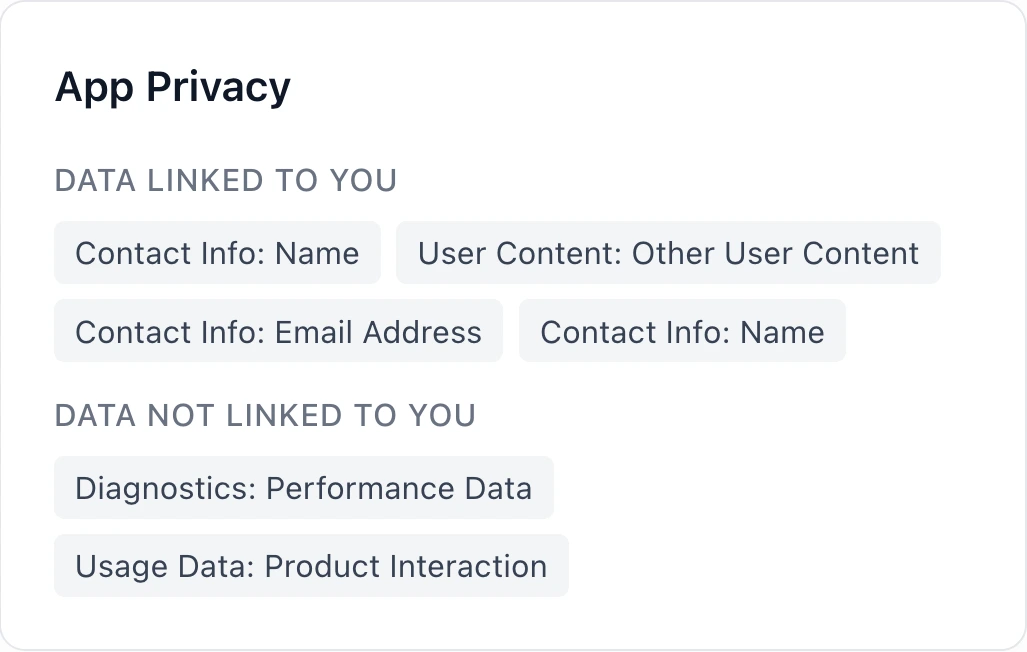
Data Linked to You
What it means: This data is associated with your identity (through your account, device, or other identifiers).
Even if an app doesn't track you across other apps, it may still collect data linked to your identity:
- Your account information (name, email)
- Your usage patterns within that app
- Your location history
- Your purchase history
This data stays within the app/company but is connected to you personally.
Data Not Linked to You
What it means: This data is collected but isn't connected to your identity.
Examples:
- Anonymous analytics (how many people tap a button, without knowing which individuals)
- Aggregated usage statistics
- Crash reports with no user identifiers
This is the most privacy-friendly category - the app collects data for product improvement but can't trace it back to you.
Data Types Explained
Privacy labels categorize collected data into specific types. Here's what each means:
Contact Information
| Data Type | Description |
|---|---|
| Name | First, last, or display name |
| Email Address | Personal or work email |
| Phone Number | Mobile or landline |
| Physical Address | Home, work, or other addresses |
| Other User Contact Info | Any other contact details |
Why apps collect it: Account creation, notifications, password recovery, two-factor authentication.
Health & Fitness
| Data Type | Description |
|---|---|
| Health | Medical data, clinical records, lab results |
| Fitness | Workout data, step counts, exercise metrics |
Why apps collect it: Fitness tracking, health monitoring, integration with Apple Health.
Special considerations: Health data has extra regulatory protection in many jurisdictions. Apps collecting health data should have clear privacy policies.
Financial Information
| Data Type | Description |
|---|---|
| Payment Info | Credit card numbers, bank accounts (usually via Apple Pay) |
| Credit Info | Credit scores, credit history |
| Other Financial Info | Salary, assets, financial statements |
Why apps collect it: Payment processing, loan applications, financial services.
Location Data
| Data Type | Description |
|---|---|
| Precise Location | Exact GPS coordinates (within meters) |
| Coarse Location | Approximate location (city or region level) |
Why apps collect it: Navigation, weather, local content, delivery services.
Precision matters: An app needing to know your city for weather is different from one tracking your exact location continuously.
Identifiers
| Data Type | Description |
|---|---|
| User ID | Account identifiers, usernames |
| Device ID | IDFA, IDFV, or other device identifiers |
Why apps collect it: Account management, analytics, advertising (for IDFA).
Important: Device ID collection for tracking purposes requires App Tracking Transparency permission since iOS 14.5.
Usage Data
| Data Type | Description |
|---|---|
| Product Interaction | How you use the app, features accessed, actions taken |
| Advertising Data | Ad clicks, ad views, campaign conversions |
| Other Usage Data | Any other usage metrics |
Why apps collect it: Product improvement, feature development, advertising performance.
Browsing History
| Data Type | Description |
|---|---|
| Browsing History | Websites visited, in-app content viewed |
Why apps collect it: Content recommendations, advertising targeting, analytics.
Search History
| Data Type | Description |
|---|---|
| Search History | Searches performed in-app or via the app |
Why apps collect it: Improving search results, personalization, analytics.
Purchases
| Data Type | Description |
|---|---|
| Purchase History | Items bought, subscriptions, in-app purchases |
Why apps collect it: Purchase records, recommendations, customer service.
User Content
| Data Type | Description |
|---|---|
| Emails or Text Messages | Email or message content (rare for most apps) |
| Photos or Videos | User-uploaded or captured media |
| Audio Data | Voice recordings, audio files |
| Gameplay Content | Game progress, in-game actions |
| Customer Support | Support tickets, chat logs |
| Other User Content | Any other user-generated content |
Why apps collect it: Core functionality (messaging apps need messages), customer support.
Sensitive Information
| Data Type | Description |
|---|---|
| Sensitive Info | Racial/ethnic data, sexual orientation, disability, religious beliefs, political opinions, trade union membership, genetic data, biometric data |
Why apps collect it: Rarely legitimate; typically for demographic research or specific services.
Caution: Apps collecting sensitive info should have extremely clear justification.
Diagnostics
| Data Type | Description |
|---|---|
| Crash Data | Crash logs, error reports |
| Performance Data | App performance metrics, load times |
| Other Diagnostic Data | Technical debugging information |
Why apps collect it: Bug fixing, performance optimization, quality assurance.
This is generally benign - it helps developers fix bugs and improve apps.
How to View an App's Privacy Data
On the App Store
- Open the App Store app or website
- Navigate to the app's product page
- Scroll to the "App Privacy" section
- Tap/click to expand and see details
The App Store shows a summary view. For apps with extensive data collection, you may need to tap "See Details" to see everything.
Using AppDelta (More Detailed)
AppDelta provides a comprehensive, structured view of privacy data:
- Go to AppDelta
- Search for any app by name or bundle ID
- Scroll to the App Privacy section
- View all data types organized by category and purpose
On AppDelta, you can see:
- Every data type collected
- The purpose of each collection (Analytics, Advertising, Product Personalization, etc.)
- Whether each data type is linked to identity
- The full list without needing to expand sections
This makes it easier to compare privacy practices across multiple apps or to do systematic privacy research.
Privacy Comparison Across Categories
Different app categories have different privacy norms. Here's what to expect:
Social Media Apps
Social media typically collects extensive data:
- Contact information (for friend finding)
- User content (posts, messages, photos)
- Usage data (detailed interaction tracking)
- Identifiers (for advertising)
- Location (for geo-tagged posts)
Most social platforms use data for advertising, making them heavy on the "Data Used to Track You" category.
Productivity Apps
Productivity apps are often more privacy-friendly:
- Minimal contact info (account only)
- User content (documents, notes - core functionality)
- Crash data (for debugging)
- Limited or no tracking
Notable exceptions exist (some note-taking apps use extensive analytics), so always check.
Games
Free-to-play games typically collect:
- Identifiers (for ad targeting)
- Usage data (for monetization optimization)
- Gameplay content (for game features)
- Often heavy on advertising data
Premium (paid) games tend to collect less, since they don't rely on advertising revenue.
Health Apps
Health apps occupy a unique position:
- Health and fitness data (core functionality)
- Often minimal advertising (due to sensitivity)
- Stronger regulatory requirements in many jurisdictions
Check whether health data is linked to your identity or kept anonymous.
Financial Apps
Banking and finance apps collect:
- Financial information (core functionality)
- Contact information (for security and notifications)
- Usually minimal tracking (regulated industry)
Financial apps typically have robust privacy practices due to banking regulations.
Using Privacy Data for Competitive Intelligence
Privacy labels aren't just for users - they're valuable for product and market research.
Privacy as a Differentiator
If your category has privacy-invasive leaders, consider:
- Positioning as the privacy-respecting alternative
- Marketing around minimal data collection
- Highlighting what you don't collect
Example: A messaging app that doesn't collect contact lists differentiates from those that do.
Understanding Competitor Business Models
Privacy labels reveal business models:
- Heavy advertising data + tracking = ad-supported
- Minimal data collection = subscription or premium model
- Analytics only = product-focused development
Benchmarking Your Own Practices
Compare your app's privacy label to competitors:
- Are you collecting more or less data?
- Is your data collection justified by features?
- Could you reduce collection without losing functionality?
Limitations of Privacy Labels
Privacy labels are useful but imperfect. Be aware of:
Self-Reporting Issues
Developers may:
- Misunderstand what their third-party SDKs collect
- Forget to update labels when adding new data collection
- Interpret categories differently than intended
Update Lag
Labels should be updated with each app submission, but:
- Some developers forget to update
- Changes may take time to reflect
- Historical data practices aren't shown
Third-Party SDK Opacity
Many developers don't fully know what SDKs collect:
- Analytics SDKs may collect more than expected
- Ad SDKs may have complex data practices
- SDK updates may change data collection
No Enforcement Visibility
You can't easily tell:
- Whether Apple has reviewed the claims
- Whether discrepancies have been flagged
- What happens if labels are inaccurate
Best Practices for Users
Before Installing an App
- Check the privacy label on the App Store or AppDelta
- Consider whether the data collection is justified by the app's purpose
- Compare with alternatives if privacy is important to you
- Read the privacy policy for details beyond the label
For Existing Apps
- Review privacy labels for apps you already use
- Check app settings for privacy controls (many apps let you opt out of some data collection)
- Revoke permissions you're not comfortable with (Settings > Privacy)
- Consider alternatives for apps with excessive collection
Questions to Ask
- Does this app need all the data it collects?
- Is tracking necessary, or could it work without?
- What happens to my data if the company is acquired?
- Can I use the app without creating an account?
Conclusion
App Store privacy labels have transformed how we can evaluate app privacy before downloading. While not perfect, they provide unprecedented transparency into data practices across millions of apps.
For users, labels enable informed decisions about which apps to trust with your data. For developers and researchers, they reveal competitor practices and industry norms. For the ecosystem as a whole, they've raised the bar for privacy transparency.
Use AppDelta to explore privacy data for any app in our database of 2.4M+ apps. Compare competitors, research categories, and make informed decisions about the apps you use and build.
Resources
- AppDelta.io - View privacy data for any app
- Query Explorer - Search and filter apps by various criteria
- Apple's App Privacy Details documentation
- Apple's App Tracking Transparency documentation